Fake Instagram Live Generator
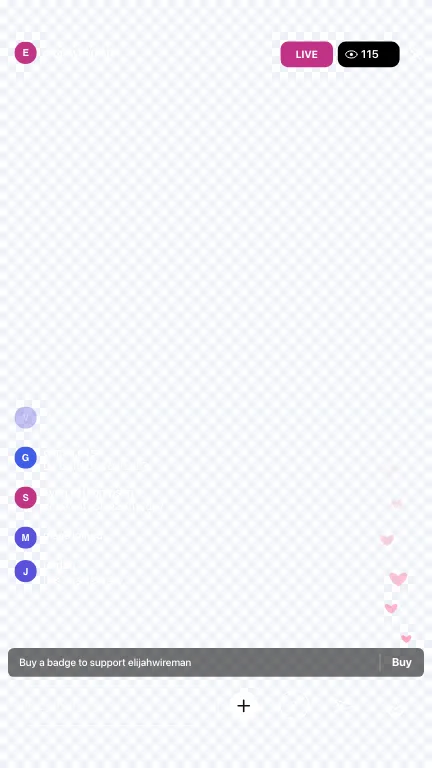
Build a fake Instagram Live comments screen for skits and edits — host avatar and name, LIVE pill, viewer count, two-line comment rows, join notices, optional badge CTA, and floating hearts. Styled after Instagram Live from the best available 2023 references; badges and icons are look-alikes. Not affiliated with Meta or Instagram.
Live room
Bottom bar
Presets
Comments
Bulk paste
Preview 1080×1920 logical · styled after Instagram Live (2023 refs) · not affiliated with Meta / Instagram
How to Make a Fake Instagram Live
- Pick a layout. Full Screen for a 9:16 phone mockup with a video frame, or Overlay for chroma-key edits in CapCut / Premiere.
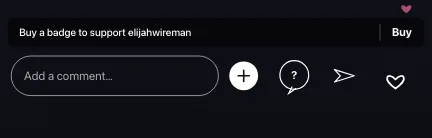
- Set the room. Host name, Viewers, bottom-bar style (Add a comment… vs outlined Comment), emoji-row count, Buy-a-badge row, and floating hearts.
- Start from a preset or paste. Chill Q&A / Hype drop fill sample fake IG live comments, or paste
username: text/name joinedbulk scripts. Username and comment sit on separate lines in the render. - Edit message kinds. Each row can be a comment, a join notice (with extra join count), or the badge CTA line. Reorder, rename, and delete until the scene matches the skit.
- Export. Download PNG, Copy, or Export Scrolling Video with animated hearts. On Overlay, pick Key color green or blue. Free videos: ≤12 messages + small watermark; Pro: longer, HD, 4K PNG, no mark.
Layouts You’ll Export
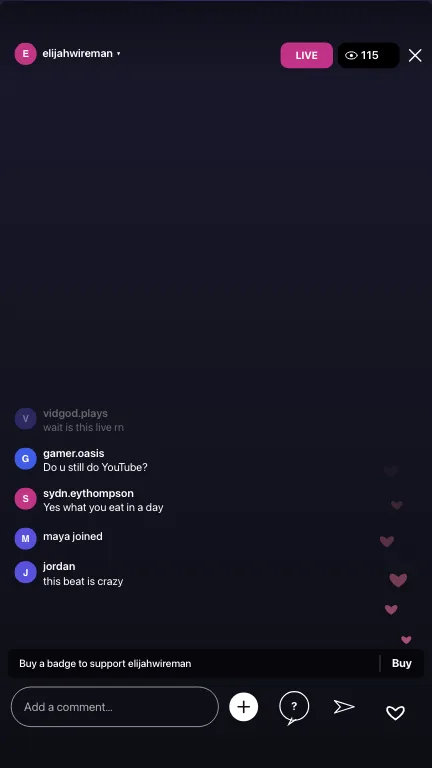
Fake IG Live Comments — Pasteable Scripts
How to fake an IG live scene for a skit: write the lines you want to react to, export, then film the reaction. These scripts paste straight into the bulk field.
1. Chill Q&A live
vidgod.plays: wait is this live rn
gamer.oasis: Do u still do YouTube?
sydn.eythompson: Yes what you eat in a day
maya joined
jordan: this beat is crazy
2. Product drop / hype
nova_beats: DROP IT
kit: fire fire fire
lee: volume up fr
sam joined
rio: link in bio??
3. Reading-chat skit
curious.k: wait what did you just say
lina: say it again slower
devon: I need context
ami joined
coach.jay: okay but explain the tip again
4. Design / storyboard still
Use Full Screen PNG for decks when you need a believable fake Instagram Live frame without recording a real broadcast.
designer.mia: love the lighting
prod.note: can we keep this energy in cut 2
viewer_91: first time catching you live
alex joined
qa_team: hearts on for the reaction shot
Export Settings
| Output | What you get | Plan |
|---|---|---|
| PNG | Full Screen 9:16 or Overlay still | Free |
| Transparent / key | Overlay layout; green or blue chroma for CapCut | Free |
| Scrolling video ≤12 msgs | Comments + hearts; small watermark on free videos | Free |
| 4K PNG & long HD video | Longer chats, HD toggle, 4K PNG, no watermark | Pro |
What This Mockup Matches
Geometry for the LIVE pill (131×64 @1080w, ≈#C13286) and viewer pill comes from measurable 1080×1920 green-screen frames. Comment structure, top fade, badge CTA, and the “Add a comment…” bar come from a real 2023 viewer capture. Where those sources disagree (bottom bar, emoji count), the tool lets you switch instead of inventing a 2026 UI.
An Instagram live comment generator like this is for mockups — skits, edits, tutorials, and comps. It is not a bot, not a viewer booster, and not affiliated with Meta or Instagram.
When you fake an IG live scene for a skit, film the reaction separately: export Overlay scrolling video, key out green or blue in CapCut, then cut to your face reacting to the scripted lines. Keep join notices and one off-topic comment in the stack so the room feels busy instead of staged. Full Screen PNG stills work for storyboards, pitch decks, and “before / after” overlays when you only need a single frame.
Fake IG live comments should read shorter than feed comments — one thought, lots of slang, occasional emoji. Toggle the Buy-a-badge row off if the skit is not about supporting the host; leave floating hearts on when you want motion even on a still export (hearts animate in scrolling video). Everything renders locally in your browser.
More Live Chat Styles
Prefer a neutral fake live stream first? Open the Fake Live Chat Generator, then switch to Instagram Live — or try the TikTok Live Comment Generator, Fake Twitch Chat, Fake YouTube Live Chat, or Fake Kick Chat.
Related guides: How to make fake Instagram comments for a mockup and CapCut overlay tutorial.
Fake Instagram Live FAQ
How do I make a fake Instagram Live screen?
Pick Full Screen or Overlay, set the host name and viewer count, edit comments (username on one line, text below), choose the bottom-bar style, then download a PNG or export a scrolling video with floating hearts. Everything renders in your browser.
Is this a real Instagram Live bot or viewer tool?
No. This is a mockup for skits, edits and design comps. It never connects to Instagram, never joins a live, and never sends comments or reactions to a real broadcast.
Why are there two bottom-bar styles?
Available 2023 references disagree: one green-screen pack shows an outlined “Comment” field with quick reactions; a real viewer capture shows “Add a comment…” with +, Q&A, send and heart. Default is the real-capture layout; switch anytime.
Can I export a chroma-key Instagram Live overlay?
Yes. Choose Overlay, pick green or blue, and export a scrolling video. Free exports include up to 12 messages; Pro unlocks longer videos, HD, and 4K PNG. Free videos carry a small fakecomment.net watermark.
Does it look like today’s Instagram Live?
It is styled after measurable 2023 Instagram Live UI (1080×1920 green-screen frames plus a real viewer capture): LIVE pill, viewer count, two-line comments, join notices, optional badge CTA, and floating hearts. Badges and icons are look-alikes — FakeComment is not affiliated with Meta or Instagram.
Is this free to use?
Yes for the basic mockup: unlimited PNGs at native phone resolution and scrolling videos up to 12 messages. Free videos include a small fakecomment.net watermark; Pro removes it and adds longer videos, HD, and 4K.
How do I fake an IG live scene for a skit?
Write the comments you need to “read” on camera, pick Full Screen with a background frame or Overlay for CapCut, export PNG or Scrolling Video, then cut the reaction shot. Keep chat short and messy — real IG lives are not polished threads.
Can I paste fake IG live comments in bulk?
Yes. Use one `username: text` per line, or `name joined` for join notices. Username and comment render on separate lines in the preview — not `name: text` on a single row.