Fake YouTube Live Chat Generator
Build a fake YouTube live chat with Super Chats, member and moderator badges, a pinned message, and every line written by you. Export the chat panel, a transparent overlay, a full 16:9 stream screen, or a scrolling chat video where messages arrive one by one.
Stream
Start from a chat
Messages (12)
Paste a whole chat
How to Make a Fake YouTube Live Chat
- Start from a chat. Pick Premiere, Gaming, or Podcast Q&A — or paste one
@name: messageper line in the bulk field and Replace / Append. - Set Channel + scene. Channel name, Watching now, and (on Stream Screen) Stream title plus an optional uploaded frame. Choose Chat Panel, Overlay, or Stream Screen; Dark / Light; welcome notice; optional pinned message (name + text).
- Cast your viewers. Set each line as viewer, member, moderator, or channel owner; add verified / fan rank; turn any line into a Super Chat ($2–$100). Reorder or delete as needed.
- Export. Download PNG or Copy. For motion, set Message speed, pick Key color on Overlay, then Export Scrolling Video. Free: ≤12 messages with a small watermark. Pro: longer video, HD, 4K PNG, no mark.
Layouts & Preview Examples
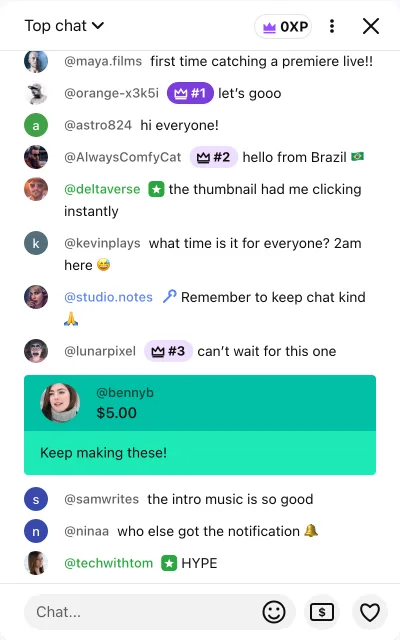
Super Chats, Members and Moderators
Real YouTube chats aren’t a wall of identical lines. Super Chats stand out as colored cards — blue for small amounts through teal, green, yellow, orange and magenta up to red at $100 and above. Channel members show green names with a member badge, moderators show blue names with a wrench, and the streamer’s own messages sit in a yellow name chip. Mixing a few of these into your chat is what makes a screenshot read as a real stream.
Use Cases with Pasteable Scripts
Paste into the bulk field as @name: message. Add Super Chats and roles in the per-message controls after paste.
1. Premiere night
@maya.films: first time catching a premiere live!!
@astro824: hi everyone!
@deltaverse: the thumbnail had me clicking instantly
@studio.notes: Remember to keep chat kind
@bennyb: Keep making these!
@ninaa: who else got the notification
2. Gaming highlight + Super Chat mockup
@clutchcity: NO WAY
@zeroping: that aim is insane
@mod_rachel: Please no spoilers in chat
@hydra_gg: bro is cracked
@dpad: play the new map next!!
@brandon.v: clip that
After paste, turn @lowlatency-style lines into Super Chats ($5 / $20 / $50) so the card colors sell the moment.
3. Podcast Q&A
@curiousmind: Question: how did you two meet?
@elena.r: love this format
@host_team: Drop your questions below
@quietlistener: first time live, long time listener
@kiki: what mic are you using?
@sophia: Q: favorite guest so far?
4. Live chat overlay for YouTube videos
Switch to Overlay, export transparent PNG or chroma scrolling video, and place it over B-roll when the edit needs “chat energy” without a real live.
@editor_jay: does this sit clean over the lower third
@pixel: white text ok on bright b-roll?
@mod_sam: keep chat kind in the cut
@viewer42: first time here from the Shorts
@member_kim: waiting for the Super Chat bit
@host: thanks for hanging in chat
Export Settings
| Output | What you get | Plan |
|---|---|---|
| PNG | Chat Panel, Overlay (transparent), or Stream Screen | Free |
| Scrolling video ≤12 msgs | Pop-in chat; small watermark on free videos | Free |
| Chroma green / blue | Overlay video for CapCut / OBS / Resolve | Free |
| 4K PNG & long HD video | >12 messages, HD, 4K PNG, no watermark | Pro |
What a Fake YouTube Live Chat Is Used For
Creators script chat reactions for skits and “reading chat” segments, editors cut a chat panel into highlight videos, thumbnail designers grab a single Super Chat, and new streamers preview how their stream layout will look before going live. Teachers use it to explain how live chat and Super Chats work without showing real viewers’ names.
Truthful use only: this YouTube live chat generator is a mockup. It does not connect to YouTube, inflate viewers, or fake real engagement.
More Live Chat Styles
Prefer a neutral fake live stream first? The Fake Live Chat Generator starts platform-agnostic, then switches into YouTube Live style. Sibling pages: Fake Twitch Chat Generator, Fake Instagram Live, Fake Kick Chat, and the TikTok Live Comment Generator. For chat wording help, try the Fake Comment Writer.
Guides: CapCut overlay tutorial and How to create fake comments for videos.
Fake YouTube Live Chat FAQ
How do I make a fake YouTube live chat?
Pick a starting chat (Premiere, Gaming, Podcast Q&A) or paste your own lines as `@name: message`. Edit names, avatars and messages, mark viewers as members, moderators or the channel owner, add Super Chats, then download a PNG or export a scrolling video. Everything renders in your browser.
Can I make a fake YouTube live chat video that scrolls?
Yes. Export Scrolling Video records the chat with messages arriving one at a time at slow, normal or fast speed. The Chat Panel and Stream Screen layouts record exactly as previewed; the Overlay layout records on a green or blue chroma-key background so you can key it over your footage in CapCut, Premiere, DaVinci Resolve or OBS.
Can I add Super Chats, members and moderators?
Yes. Each message can be a Super Chat from $2 to $100, colored by amount the way YouTube tiers them. Members get green names and a member badge, moderators get blue names and a wrench, and the channel owner gets the yellow name chip. You can also add a verified check and a crown fan-rank pill.
Does it look like the real YouTube live chat?
The panel is measured from a real 2026 desktop capture: the 400px chat panel, 50px “Top chat” header, 24px round avatars, badges drawn after the name, the welcome notice card and the pill-shaped chat box. Badge icons are simplified look-alikes drawn by this tool, not YouTube’s own artwork.
Can I put the chat over my own video?
Two ways. Use the Overlay layout and download a transparent PNG to place over your footage, or switch to Stream Screen, upload a frame from your video, and export the full 16:9 live-stream view with the chat panel beside it.
Is this free, and is it affiliated with YouTube?
PNG downloads are free with no signup and no watermark. Free scrolling videos include up to 12 messages and a small fakecomment.net mark; Pro removes the mark and unlocks longer videos, HD, and 4K PNG. FakeComment is an independent mockup tool and is not affiliated with or endorsed by YouTube or Google. Use it for skits, edits, thumbnails, tutorials and overlay design — not to fake real audience activity.
How do I make a Super Chat mockup?
Open any message, turn on Super Chat, and pick an amount from $2 to $100. The card color follows YouTube-style tiers. Mix one or two Super Chats into a normal chat so the screenshot reads like a real premiere or live.
What is a live chat overlay for YouTube videos?
Switch to Overlay, download a transparent PNG or export a chroma-key scrolling video, then place it over your edit in CapCut, Premiere, or OBS. Use Stream Screen when you want the chat panel locked beside a 16:9 frame instead.